
New Hosting Revenue — Unlocked!
Launch your own professional WordPress services without upfront
investment or headcount. Powered by Seahawk — Branded as you.

MAx Cache Now Available for Nginx: Server-Level WordPress Caching, Completely Bypassing PHP

max_cache_nginx_beta_release

In December 2025, we released MAx Cache for Apache, a native module that serves cached WordPress pages directly from the web server without invoking PHP. Today, we're bringing that same capability to Nginx with a purpose-built module that delivers even greater performance gains than the Apache version.

MAx Cache for Nginx works alongside AccelerateWP: hosting providers deploy it at the server level, and site owners enable it through the AccelerateWP plugin in WordPress.

The PHP Performance Bottleneck

Running PHP is expensive. Traditional WordPress caching solutions still require PHP to handle routing decisions, process headers, and determine which cached page to serve, even when the content is already static. That overhead adds up, especially under high traffic.

MAx Cache moves all of that logic out of PHP and into the web server itself. Routing decisions and cache-key computation happen in C, so PHP runs only on cache misses. We first delivered this for Apache. Now, the Nginx implementation takes it further by leveraging Nginx's event-driven architecture and a shared-memory configuration approach that eliminates file I/O entirely on the request path.

Performance Gains

In our internal benchmarks, MAx Cache for Nginx delivers:

  • ~3x increase in requests per second (RPS)
  • ~6x improvement in Time to First Byte (TTFB)
  • ~5x reduction in CPU, memory, and load for PHP page serving

These gains exceed what we measured with the Apache module (~2x RPS, ~2x TTFB). The difference reflects the combined effect of Nginx's efficient event-driven architecture and MAx Cache's shared-memory configuration, which avoids disk I/O on every request. We expect these gains to be even more pronounced under high concurrency.

What This Means for Hosting Providers

MAx Cache for Nginx is included with all CloudLinux licenses at no additional cost. For hosting providers running Nginx, the benefits are twofold. On the server side, lower CPU and memory consumption means higher hosting density. On the customer side, faster page loads and improved TTFB translate to a better experience for the people visiting your customers' sites. Faster sites mean happier end customers, lower churn, and fewer performance-related support tickets.

Combined with AccelerateWP, MAx Cache delivers WordPress performance that plugin-only caching solutions cannot match. Plugins still route every request through PHP, even cached ones. MAx Cache bypasses PHP entirely for cached pages. That is a server-level optimization no WordPress plugin can replicate.

How It Works

Nginx is a fundamentally different web server from Apache. It doesn't read .htaccess files, doesn't support per-directory configuration overrides, and uses a different request processing model. Porting the Apache module directly wouldn't work. Instead, MAx Cache for Nginx shares the same core caching logic but uses a purpose-built configuration and request-handling architecture designed for Nginx.

Shared Core Library

Both the Apache and Nginx modules use libmaxcache, a shared C library that handles:

  • Device detection (mobile, tablet, desktop)
  • WebP support detection
  • WordPress user authentication state
  • Dynamic cookie suffix computation
  • Query string normalization with allowed/ignored parameters

This shared library ensures that both modules produce bit-for-bit identical cache paths, so the same cached pages work regardless of which web server is in front.

Dynamic Configuration via Shared Memory

Nginx doesn't read .htaccess files or support per-directory configuration overrides, so MAx Cache for Nginx introduces maxcache-configd, a lightweight configuration daemon that bridges the gap:

  1. When a WordPress administrator enables or configures MAx Cache through AccelerateWP, the plugin writes its configuration to .htaccess (as it does for Apache) and sends a notification to the daemon via a Unix socket.
  2. maxcache-configd parses the .htaccess directives and writes the parsed configuration into shared memory (/dev/shm/maxcache_config).
  3. The Nginx module reads configuration directly from shared memory with zero file I/O.

This means configuration updates take effect immediately without requiring an Nginx restart or reload. When a site owner toggles MAx Cache in their WordPress dashboard, the change is live within milliseconds.

Technical Highlights

  • Server-level routing in C: All cache-key computation and routing decisions happen in a native Nginx module, not in PHP.
  • No PHP execution on cache hits: Nginx serves cached pages directly. PHP-FPM is never invoked for cached requests.
  • Zero file I/O on the request path: Configuration is read from shared memory, not from disk. Cache files are served via Nginx's optimized static file handling.
  • Automatic configuration updates: Changes propagate through shared memory with no Nginx restarts or reloads required.
  • Full cache-key support: Device detection, WebP variants, gzip pre-compressed files, SSL/HTTPS variants, logged-in user cache separation, dynamic cookies, and normalized query strings.
  • Subrequest-aware: The module correctly bypasses the cache for internal subrequests such as auth_request and SSI includes.
  • AccelerateWP compatibility: Works with the same AccelerateWP plugin interface that hosting providers and site owners already use.

How to Get Started

This first release of MAx Cache for Nginx is available as a beta for early adopters who want to test it in real hosting environments. It currently supports cPanel on CloudLinux 7/8/9 Shared Pro, Admin, and Solo editions using ea-nginx in reverse proxy mode or standalone mode.

In order for MAx Cache to function on a website, it needs to be deployed at the server level, and also activated in AccelerateWP by the WordPress administrator at the website level.

Installation steps for hosting providers

  1. To install packages, run the following commands:

yum install accelerate-wp cloudlinux-site-optimization-module libmaxcache libmaxcache-configd --enablerepo=cloudlinux-updates-testing

yum install ea-nginx-maxcache --enablerepo=cl-ea4-testing

The maxcache-configd daemon will start automatically after installation and begin managing configurations for all enabled domains.
  1. Enable MAx Cache for all available domains:
cloudlinux-awp-admin maxcache --enable --all
i

MAx Cache default state in AccelerateWP:

1. On websites where AccelerateWP is already present when MAx Cache is deployed on the server, MAx Cache is turned off by default at the website level.

2. On websites where AccelerateWP is installed after MAx Cache is deployed on the server, MAx Cache is turned on by default at the website level.


Activation steps for website owners

Once MAx Cache is successfully installed on the server, website owners can activate it for their websites with the following steps:

  1. Update the AccelerateWP plugin to the latest version:
    1. Log in to WordPress Admin Dashboard.
    2. Navigate to Plugins > Installed Plugins.
    3. Find AccelerateWP in the list of plugins and if there is a newer version available, click on "update now."
    4. Wait until the update is completed.
  2. To turn on MAx Cache:
    1. In the WordPress Admin Dashboard, navigate to AccelerateWP > Settings > Add-Ons.
    2. Click on the toggle next to the MAx Cache feature to activate it.
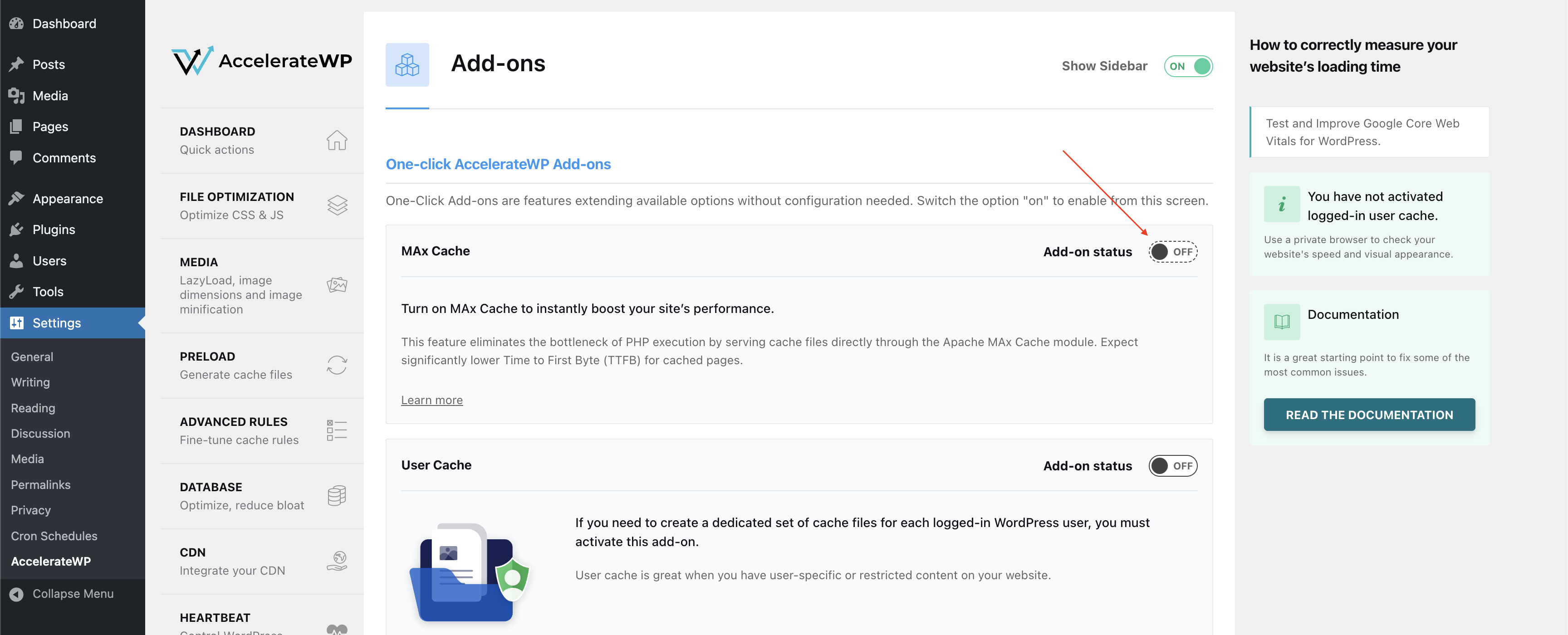
max_cache_in_acceleratewp

i

We recommend enabling auto-updates for AccelerateWP to ensure all improvements and fixes are applied immediately. Here are the steps for WordPress admins:

1. In the WordPress Admin Dashboard, navigate to Plugins > Installed Plugins.

2. Find the AccelerateWP plugin in the list and click the "Enable auto-updates" link on the right. (The link will change to "Disable auto-updates," indicating it is now active.)

Looking for Feedback

We are eager to hear how MAx Cache performs in your hosting environment. As this is a beta release, your feedback is invaluable in helping us refine the module before general availability. Please use the CloudLinux Feature Portal to provide any feedback or ideas.

Follow our blog for updates on our progress and the latest releases.

MAx Cache Now Available for Nginx: Server-Level WordPress Caching, Completely Bypassing PHP

max_cache_nginx_beta_release

In December 2025, we released MAx Cache for Apache, a native module that serves cached WordPress pages directly from the web server without invoking PHP. Today, we're bringing that same capability to Nginx with a purpose-built module that delivers even greater performance gains than the Apache version.

MAx Cache for Nginx works alongside AccelerateWP: hosting providers deploy it at the server level, and site owners enable it through the AccelerateWP plugin in WordPress.

The PHP Performance Bottleneck

Running PHP is expensive. Traditional WordPress caching solutions still require PHP to handle routing decisions, process headers, and determine which cached page to serve, even when the content is already static. That overhead adds up, especially under high traffic.

MAx Cache moves all of that logic out of PHP and into the web server itself. Routing decisions and cache-key computation happen in C, so PHP runs only on cache misses. We first delivered this for Apache. Now, the Nginx implementation takes it further by leveraging Nginx's event-driven architecture and a shared-memory configuration approach that eliminates file I/O entirely on the request path.

Performance Gains

In our internal benchmarks, MAx Cache for Nginx delivers:

  • ~3x increase in requests per second (RPS)
  • ~6x improvement in Time to First Byte (TTFB)
  • ~5x reduction in CPU, memory, and load for PHP page serving

These gains exceed what we measured with the Apache module (~2x RPS, ~2x TTFB). The difference reflects the combined effect of Nginx's efficient event-driven architecture and MAx Cache's shared-memory configuration, which avoids disk I/O on every request. We expect these gains to be even more pronounced under high concurrency.

What This Means for Hosting Providers

MAx Cache for Nginx is included with all CloudLinux licenses at no additional cost. For hosting providers running Nginx, the benefits are twofold. On the server side, lower CPU and memory consumption means higher hosting density. On the customer side, faster page loads and improved TTFB translate to a better experience for the people visiting your customers' sites. Faster sites mean happier end customers, lower churn, and fewer performance-related support tickets.

Combined with AccelerateWP, MAx Cache delivers WordPress performance that plugin-only caching solutions cannot match. Plugins still route every request through PHP, even cached ones. MAx Cache bypasses PHP entirely for cached pages. That is a server-level optimization no WordPress plugin can replicate.

How It Works

Nginx is a fundamentally different web server from Apache. It doesn't read .htaccess files, doesn't support per-directory configuration overrides, and uses a different request processing model. Porting the Apache module directly wouldn't work. Instead, MAx Cache for Nginx shares the same core caching logic but uses a purpose-built configuration and request-handling architecture designed for Nginx.

Shared Core Library

Both the Apache and Nginx modules use libmaxcache, a shared C library that handles:

  • Device detection (mobile, tablet, desktop)
  • WebP support detection
  • WordPress user authentication state
  • Dynamic cookie suffix computation
  • Query string normalization with allowed/ignored parameters

This shared library ensures that both modules produce bit-for-bit identical cache paths, so the same cached pages work regardless of which web server is in front.

Dynamic Configuration via Shared Memory

Nginx doesn't read .htaccess files or support per-directory configuration overrides, so MAx Cache for Nginx introduces maxcache-configd, a lightweight configuration daemon that bridges the gap:

  1. When a WordPress administrator enables or configures MAx Cache through AccelerateWP, the plugin writes its configuration to .htaccess (as it does for Apache) and sends a notification to the daemon via a Unix socket.
  2. maxcache-configd parses the .htaccess directives and writes the parsed configuration into shared memory (/dev/shm/maxcache_config).
  3. The Nginx module reads configuration directly from shared memory with zero file I/O.

This means configuration updates take effect immediately without requiring an Nginx restart or reload. When a site owner toggles MAx Cache in their WordPress dashboard, the change is live within milliseconds.

Technical Highlights

  • Server-level routing in C: All cache-key computation and routing decisions happen in a native Nginx module, not in PHP.
  • No PHP execution on cache hits: Nginx serves cached pages directly. PHP-FPM is never invoked for cached requests.
  • Zero file I/O on the request path: Configuration is read from shared memory, not from disk. Cache files are served via Nginx's optimized static file handling.
  • Automatic configuration updates: Changes propagate through shared memory with no Nginx restarts or reloads required.
  • Full cache-key support: Device detection, WebP variants, gzip pre-compressed files, SSL/HTTPS variants, logged-in user cache separation, dynamic cookies, and normalized query strings.
  • Subrequest-aware: The module correctly bypasses the cache for internal subrequests such as auth_request and SSI includes.
  • AccelerateWP compatibility: Works with the same AccelerateWP plugin interface that hosting providers and site owners already use.

How to Get Started

This first release of MAx Cache for Nginx is available as a beta for early adopters who want to test it in real hosting environments. It currently supports cPanel on CloudLinux 7/8/9 Shared Pro, Admin, and Solo editions using ea-nginx in reverse proxy mode or standalone mode.

In order for MAx Cache to function on a website, it needs to be deployed at the server level, and also activated in AccelerateWP by the WordPress administrator at the website level.

Installation steps for hosting providers

  1. To install packages, run the following commands:

yum install accelerate-wp cloudlinux-site-optimization-module libmaxcache libmaxcache-configd --enablerepo=cloudlinux-updates-testing

yum install ea-nginx-maxcache --enablerepo=cl-ea4-testing

The maxcache-configd daemon will start automatically after installation and begin managing configurations for all enabled domains.
  1. Enable MAx Cache for all available domains:
cloudlinux-awp-admin maxcache --enable --all
i

MAx Cache default state in AccelerateWP:

1. On websites where AccelerateWP is already present when MAx Cache is deployed on the server, MAx Cache is turned off by default at the website level.

2. On websites where AccelerateWP is installed after MAx Cache is deployed on the server, MAx Cache is turned on by default at the website level.


Activation steps for website owners

Once MAx Cache is successfully installed on the server, website owners can activate it for their websites with the following steps:

  1. Update the AccelerateWP plugin to the latest version:
    1. Log in to WordPress Admin Dashboard.
    2. Navigate to Plugins > Installed Plugins.
    3. Find AccelerateWP in the list of plugins and if there is a newer version available, click on "update now."
    4. Wait until the update is completed.
  2. To turn on MAx Cache:
    1. In the WordPress Admin Dashboard, navigate to AccelerateWP > Settings > Add-Ons.
    2. Click on the toggle next to the MAx Cache feature to activate it.

max_cache_in_acceleratewp

i

We recommend enabling auto-updates for AccelerateWP to ensure all improvements and fixes are applied immediately. Here are the steps for WordPress admins:

1. In the WordPress Admin Dashboard, navigate to Plugins > Installed Plugins.

2. Find the AccelerateWP plugin in the list and click the "Enable auto-updates" link on the right. (The link will change to "Disable auto-updates," indicating it is now active.)

Looking for Feedback

We are eager to hear how MAx Cache performs in your hosting environment. As this is a beta release, your feedback is invaluable in helping us refine the module before general availability. Please use the CloudLinux Feature Portal to provide any feedback or ideas.

Follow our blog for updates on our progress and the latest releases.

imunify-logo

WEB SERVER SECURITY BLOG

Subscribe to CloudLinux Newsletter