
New Hosting Revenue — Unlocked!
Launch your own professional WordPress services without upfront
investment or headcount. Powered by Seahawk — Branded as you.

MAx Cache Stable Release: 3x Faster WordPress Page Loads on Apache and Nginx

max_cache_stable_release

MAx Cache is now generally available as part of CloudLinux subscriptions at no additional cost. After testing in beta, both the Apache and Nginx modules are now production-ready.

MAx Cache is a pair of native web server modules that serve cached WordPress pages directly from Apache or Nginx, without running PHP. Hosting providers deploy it at the server level. Site owners enable it through the AccelerateWP plugin in WordPress. If you followed the beta, the workflow is the same. If you're hearing about MAx Cache for the first time, read on.


For the full backstory, see our earlier posts on MAx Cache for Apache and MAx Cache for Nginx. 


What MAx Cache Does

Most WordPress caching plugins generate static HTML and store it on disk, but they still rely on PHP to decide which cached file to serve. Every request goes through PHP for routing, header processing, and cache-key computation, even when the response is already sitting in a file. That overhead adds up, especially under load.

MAx Cache moves that decision-making out of PHP and into the web server. Both modules use a shared C library (libmaxcache) that handles device detection, WebP support, authentication state, dynamic cookies, and query string normalization. On a cache hit, the web server serves the page directly. PHP only runs when the cache needs to be regenerated.

The result is a fundamentally shorter request path for cached pages. No PHP process spawned, no framework bootstrapped, no plugin code executed.


Performance

In our internal benchmarks, MAx Cache delivers measurable gains on both web servers.

Apache:

  • ~3x increase in requests per second
  • ~3x improvement in Time to First Byte (TTFB)
  • ~75% reduction in CPU and memory usage

Nginx:

  • ~3x increase in requests per second
  • ~7x improvement in TTFB
  • ~80% reduction in CPU, memory, and load

Nginx's stronger TTFB and resource numbers reflect its event-driven architecture combined with MAx Cache's shared-memory configuration approach, which eliminates file I/O on the request path.

For hosting providers, lower resource consumption per cached request means higher hosting density on the same hardware. For site visitors, it means faster page loads. Results vary by environment, but the direction is consistent across our testing.


Getting Started

MAx Cache supports cPanel on CloudLinux 7, 8, and 9 (all editions except Legacy). For Nginx environments, it works with ea-nginx in both reverse proxy and standalone mode.


For Hosting Providers

Install the packages for your web server and enable MAx Cache across your domains.

Apache:

yum install accelerate-wp cloudlinux-site-optimization-module libmaxcache 

yum install ea-apache24-mod_maxcache 

Nginx: 

yum install accelerate-wp cloudlinux-site-optimization-module libmaxcache libmaxcache-configd

yum install ea-nginx-maxcache

Then enable MAx Cache for all available domains: 

cloudlinux-awp-admin maxcache --enable --all


i

MAx Cache default state in AccelerateWP:

1. On websites where AccelerateWP is already present when MAx Cache is deployed on the server, MAx Cache is turned off by default at the website level.

2. On websites where AccelerateWP is installed after MAx Cache is deployed on the server, MAx Cache is turned on by default at the website level.

For Site Owners

Once MAx Cache is installed on the server, activate it in WordPress:

  1. Update the AccelerateWP plugin to the latest version.
    1. Log in to WordPress Admin Dashboard.
    2. Navigate to Plugins > Installed Plugins.
    3. Find AccelerateWP and click "update now" if a newer version is available.
  2. Turn on MAx Cache.
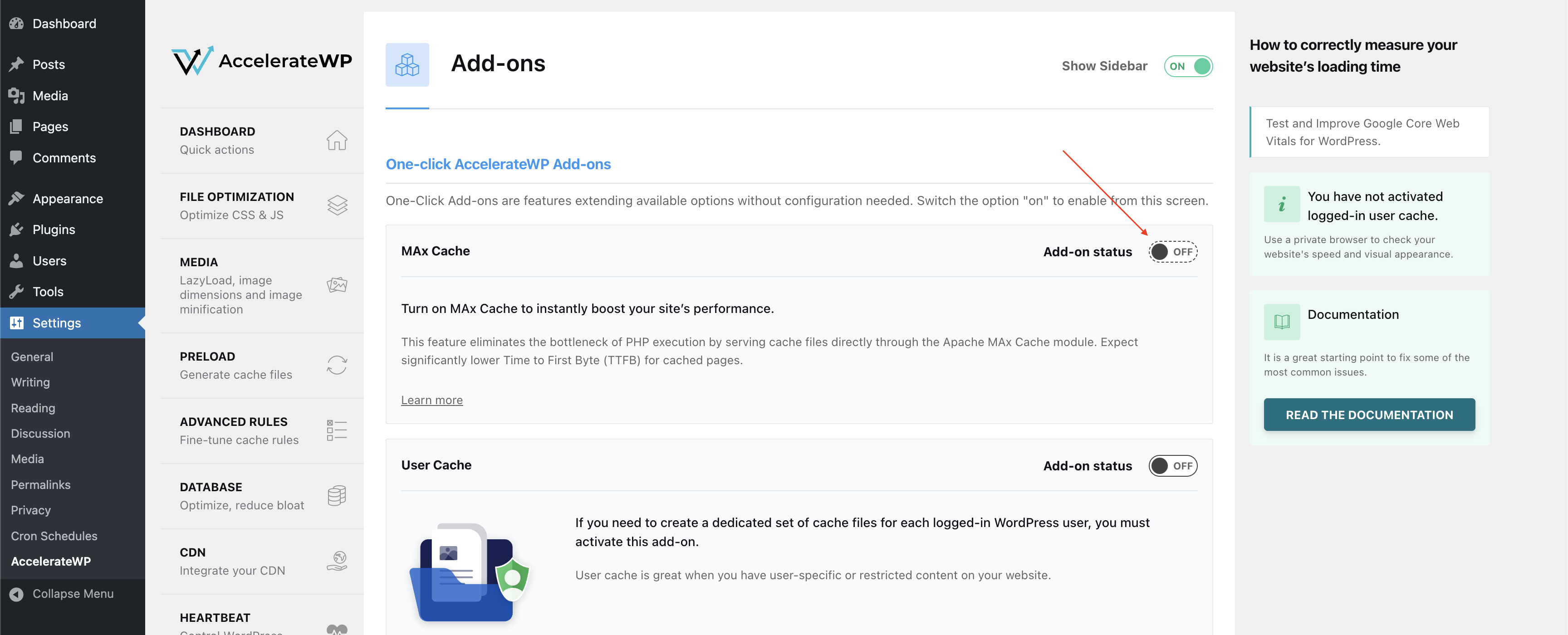
    1. In the WordPress Admin Dashboard, navigate to AccelerateWP > Settings > Add-Ons.
    2. Toggle MAx Cache on.

max_cache_in_acceleratewp

We recommend enabling auto-updates for AccelerateWP to receive improvements and fixes automatically.


What's Next

Two areas we're actively working on.

Expanding control panel support. We'll be adding support for Plesk and DirectAdmin in future releases so that hosting providers can deploy MAx Cache regardless of which control panel they run.

Opening MAx Cache to other caching plugins. Today, MAx Cache works through AccelerateWP. We want to make MAx Cache an open integration point that any caching plugin can build on, so site owners get server-level caching regardless of their plugin choice, and plugin developers can offer their users performance that was previously out of reach. If you develop a WordPress caching plugin and want to explore integration, we'd like to hear from you.


Follow our blog for updates on expanded platform support and new releases. 

MAx Cache Stable Release: 3x Faster WordPress Page Loads on Apache and Nginx

max_cache_stable_release

MAx Cache is now generally available as part of CloudLinux subscriptions at no additional cost. After testing in beta, both the Apache and Nginx modules are now production-ready.

MAx Cache is a pair of native web server modules that serve cached WordPress pages directly from Apache or Nginx, without running PHP. Hosting providers deploy it at the server level. Site owners enable it through the AccelerateWP plugin in WordPress. If you followed the beta, the workflow is the same. If you're hearing about MAx Cache for the first time, read on.


For the full backstory, see our earlier posts on MAx Cache for Apache and MAx Cache for Nginx. 


What MAx Cache Does

Most WordPress caching plugins generate static HTML and store it on disk, but they still rely on PHP to decide which cached file to serve. Every request goes through PHP for routing, header processing, and cache-key computation, even when the response is already sitting in a file. That overhead adds up, especially under load.

MAx Cache moves that decision-making out of PHP and into the web server. Both modules use a shared C library (libmaxcache) that handles device detection, WebP support, authentication state, dynamic cookies, and query string normalization. On a cache hit, the web server serves the page directly. PHP only runs when the cache needs to be regenerated.

The result is a fundamentally shorter request path for cached pages. No PHP process spawned, no framework bootstrapped, no plugin code executed.


Performance

In our internal benchmarks, MAx Cache delivers measurable gains on both web servers.

Apache:

  • ~3x increase in requests per second
  • ~3x improvement in Time to First Byte (TTFB)
  • ~75% reduction in CPU and memory usage

Nginx:

  • ~3x increase in requests per second
  • ~7x improvement in TTFB
  • ~80% reduction in CPU, memory, and load

Nginx's stronger TTFB and resource numbers reflect its event-driven architecture combined with MAx Cache's shared-memory configuration approach, which eliminates file I/O on the request path.

For hosting providers, lower resource consumption per cached request means higher hosting density on the same hardware. For site visitors, it means faster page loads. Results vary by environment, but the direction is consistent across our testing.


Getting Started

MAx Cache supports cPanel on CloudLinux 7, 8, and 9 (all editions except Legacy). For Nginx environments, it works with ea-nginx in both reverse proxy and standalone mode.


For Hosting Providers

Install the packages for your web server and enable MAx Cache across your domains.

Apache:

yum install accelerate-wp cloudlinux-site-optimization-module libmaxcache 

yum install ea-apache24-mod_maxcache 

Nginx: 

yum install accelerate-wp cloudlinux-site-optimization-module libmaxcache libmaxcache-configd

yum install ea-nginx-maxcache

Then enable MAx Cache for all available domains: 

cloudlinux-awp-admin maxcache --enable --all


i

MAx Cache default state in AccelerateWP:

1. On websites where AccelerateWP is already present when MAx Cache is deployed on the server, MAx Cache is turned off by default at the website level.

2. On websites where AccelerateWP is installed after MAx Cache is deployed on the server, MAx Cache is turned on by default at the website level.

For Site Owners

Once MAx Cache is installed on the server, activate it in WordPress:

  1. Update the AccelerateWP plugin to the latest version.
    1. Log in to WordPress Admin Dashboard.
    2. Navigate to Plugins > Installed Plugins.
    3. Find AccelerateWP and click "update now" if a newer version is available.
  2. Turn on MAx Cache.
    1. In the WordPress Admin Dashboard, navigate to AccelerateWP > Settings > Add-Ons.
    2. Toggle MAx Cache on.

max_cache_in_acceleratewp

We recommend enabling auto-updates for AccelerateWP to receive improvements and fixes automatically.


What's Next

Two areas we're actively working on.

Expanding control panel support. We'll be adding support for Plesk and DirectAdmin in future releases so that hosting providers can deploy MAx Cache regardless of which control panel they run.

Opening MAx Cache to other caching plugins. Today, MAx Cache works through AccelerateWP. We want to make MAx Cache an open integration point that any caching plugin can build on, so site owners get server-level caching regardless of their plugin choice, and plugin developers can offer their users performance that was previously out of reach. If you develop a WordPress caching plugin and want to explore integration, we'd like to hear from you.


Follow our blog for updates on expanded platform support and new releases. 

imunify-logo

WEB SERVER SECURITY BLOG

Subscribe to CloudLinux Newsletter